Sign-in With Apple
OpenSSO support Sign in with Apple. If you want to use this feature, You have to activate this from config.js.
config.js
// ---
oauth: {
  google: {
    // ...
  },
  apple: {
    enable: true,
    clientId: 'com.xxx.login',
    redirectURI: 'https://yourdomain.com'
  }
}
// ---
Description:
- apple.enable if set to true, then this feature will be activated.
- apple.clientId is the client id generated from Apple Developer Console.
- apple.redirectURI is the location to which apple will redirect us after authentication is completed.
note
- You have to get the
clientIdandredirectURIfrom Apple Developer. - You require to have an apple developer license to use this feature.
How to get the clientId and redirectURI:
- Open Your developer console and find
Certificates IDs & Profiles. - Click the
plus symbolto create a newApp ID. - Once you had the
App IDnow go back to the developer console andcreate a new identifier. This time selectServices IDs. - Once your new
Service IDis created, find it then click on yourService IDthat you just created. - You'll be greeted with a checkbox that say
Sign In with Apple. now click onConfigure.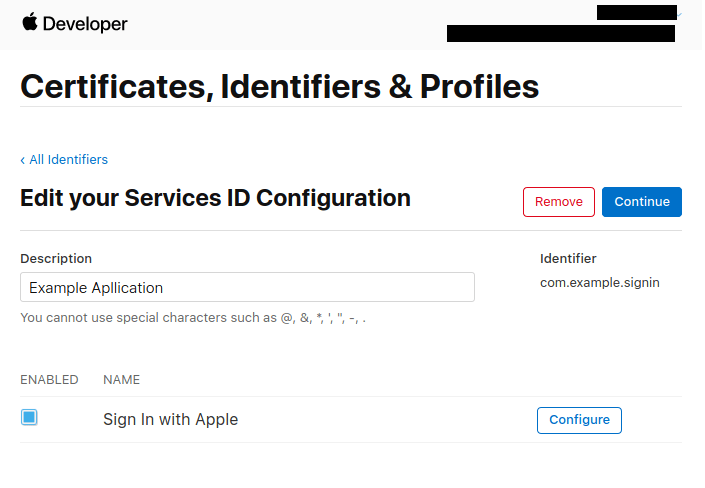
- A modal will pop up,
- As your Primary
App ID, choose the one that we just created in the previous section. - In the domains section add the domain where OpenSSO live, i.e
example.com. - The
Return URLis the location to which apple will redirect us after authentication is completed. This is also the location where apple will send the user data after authentication. Apple will send a POST request to this URL, but OpenSSO using PopUp mode, so you just write it with yourdomain.com is enough. I've assigned http://example.com assumed that OpenSSO web is live on http://example.com.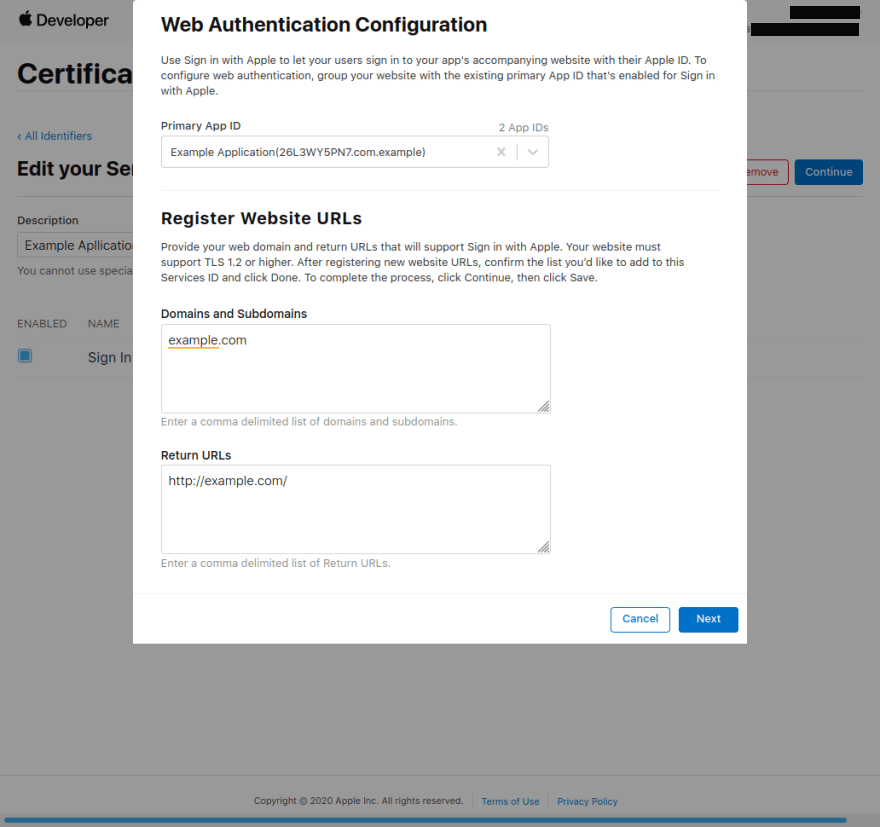
- Click Next and Done.